
Browser Sites
The Browser is a closed, in-game network: only the sites in configs/shared/browser.lua exist, and any other address "can't be reached". Nothing a player types ever reaches the real internet.
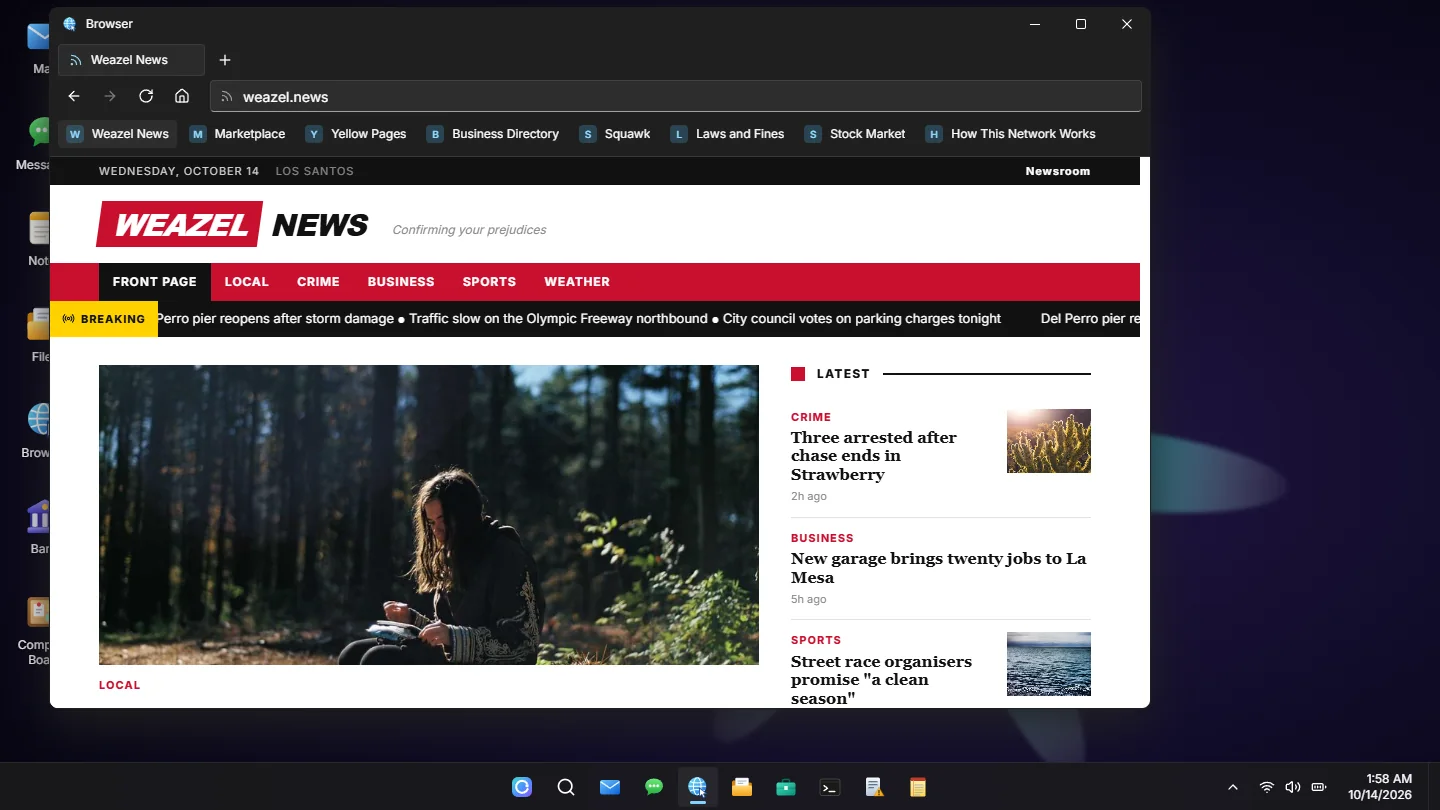
A site is one of three things:
live: one of sd-phone's public apps, as a website (Weazel News, the Marketplace, and so on)blocks: a page written right in the configurl: your own real web page, embedded
return {
    Home = 'home',

    Sites = {
        { address = 'weazel.news', title = 'Weazel News', bookmark = true, live = 'news' },
        { address = 'rules.city', title = 'Server Rules', bookmark = true, url = 'https://your-community.example/rules' },
        {
            address = 'city.gov',
            title = 'City Hall',
            bookmark = true,
            blocks = {
                { heading = 'City Hall' },
                { text = 'Permits, licences and the council.' },
                { facts = { { 'Opens', '8:00' }, { 'Closes', '18:00' } } },
                { links = { 'rules.city', 'weazel.news' } },
            },
        },
    },
}| Setting | Description |
|---|---|
Home | The address a new window and tab open on. 'home' = the built-in start page: a search box over every site, and a tile for each bookmarked one. Any site's address works too |
Sites | One entry per page |
Every Site
| Field | Description |
|---|---|
address | What is typed, and what the address bar shows: 'city.gov'. Made up: it does not have to exist anywhere. Lower case, no spaces, no https://, no www. A second page of a site is another entry with a longer address ('city.gov/permits'), and gets a link back up to city.gov by itself |
title | The page's name: on its tab, its bookmark and in search |
bookmark | true = on the bookmarks bar and the start page. Left out = reached by typing the address, searching, or a link on another page |
And one of live, blocks or url. An entry with a mistake in it (no address, no title, none of the three, an address used twice) is left out and named in the server console.
Live Sites From sd-phone
With sd-phone v1.0.7 or newer running, live shows one of the phone's public apps as a website. The address and the title are yours; what is on it is whatever the phone shows right now.
live | Site (default address) | What a player can do |
|---|---|---|
'news' | Weazel News (weazel.news) | Read the breaking line and every story. Players the phone counts as Weazel staff get a Newsroom: write, edit, feature, publish now or later, take down, and set the breaking line |
'market' | Marketplace (marketplace.ls) | Browse and search listings with photos, price and the seller's contact. Put up, edit and take down their own |
'pages' | Yellow Pages (yellowpages.ls) | The same for adverts |
'directory' | Business Directory (directory.ls) | See every company and whether anybody is on duty, and write to one (the answer comes to their phone) |
'squawk' | Squawk (squawk.ls) | Read the public feed, what is trending, a hashtag and anybody's page |
'laws' | Laws and Fines (laws.gov) | Look up any charge: its fine and its sentence, as the police terminal has them |
'stocks' | Stock Market (stocks.ls) | Watch prices and charts. Only while the phone's Stocks app is switched on |
- Reading needs no phone and no Phone Link: these are public pages, at any computer with the Browser. They refresh themselves while they are being looked at.
- Posting is done as the player at the desk, through the phone's own action for it: its limits, its "is this yours" check and its staff rule hold, and a refusal comes back in the phone's own words.
- A photo on a post has to come out of the poster's phone gallery, so the photo picker is only there while their phone is linked to that computer. The Message and Email buttons on an ad open the computer's Messages and Mail, so Message needs the link too.
- A site whose app is switched off in sd-phone, or an sd-phone older than v1.0.7, is simply not on the network, and comes back when it is.
- The penal code is open to everyone here, though on the phone only police and DOJ terminals show it. Take the
lawsline out if you would rather it stayed that way.
Pages Written in the Config
blocks is a page written in the file. The pieces are shown top to bottom:
| Block | What it is |
|---|---|
{ heading = 'The big title' } | The page's title |
{ subheading = 'A section title' } | A section heading |
{ text = 'A paragraph.' } | A paragraph |
{ list = { 'First point', 'Second point' } } | A bulleted list |
{ notice = 'A boxed message.', kind = 'warning', title = 'Bold lead-in' } | A boxed message. kind: 'info' (default), 'success', 'warning' or 'error'. title is optional |
{ facts = { { 'Opens', '8:00' }, { 'Closes', '18:00' } } } | A two-column table: a label and its value on every row |
{ links = { 'weazel.news', { 'laws.gov', 'The law', 'Small print' } } } | Links to other pages by address. A bare address shows that page's title; { address, label, small print } says it your own way |
{ image = 'https://...', caption = 'A line under the picture' } | A picture, https only. caption is optional |
The default config ships one, network.help, explaining how the network works.
Your Own Web Page
url = 'https://...' shows your own real page (rules, wiki, forum) inside the Browser, https only. The address bar keeps showing the in-game address. Links on that page work inside the Browser; it cannot open windows of its own.
The site must allow being embedded
A site that sends an X-Frame-Options or frame-ancestors header (most big sites do) shows up blank or refuses to connect. Check your own site's headers if the page stays empty.